Apify vs TikHub for TikTok Scraping, Priced Honestly
Apify vs TikHub for TikTok scraping: which wins depends on per-result vs per-call billing, field depth, and whether you need deep history or a cheap skim.

Neither Apify nor TikHub is "the" TikTok scraper. Apify actors win when you need deep post history and rich per-video fields and are happy to pay per result; TikHub wins when you want a cheap, fast pull of an account's recent posts and can live with a fixed page size. The choice is a billing-shape decision before it is a data-quality decision, and both run behind one balance, so you never have to guess which contract to sign.
Both providers sit on Monid, the OpenRouter for agent tools that gives you one key and one balance to discover, inspect, and run over a thousand tools without a separate signup per vendor. That means you can price the exact same TikTok job against both sources in an afternoon and let the invoice, not the marketing page, pick the winner.
Which is better for TikTok data, Apify or TikHub?
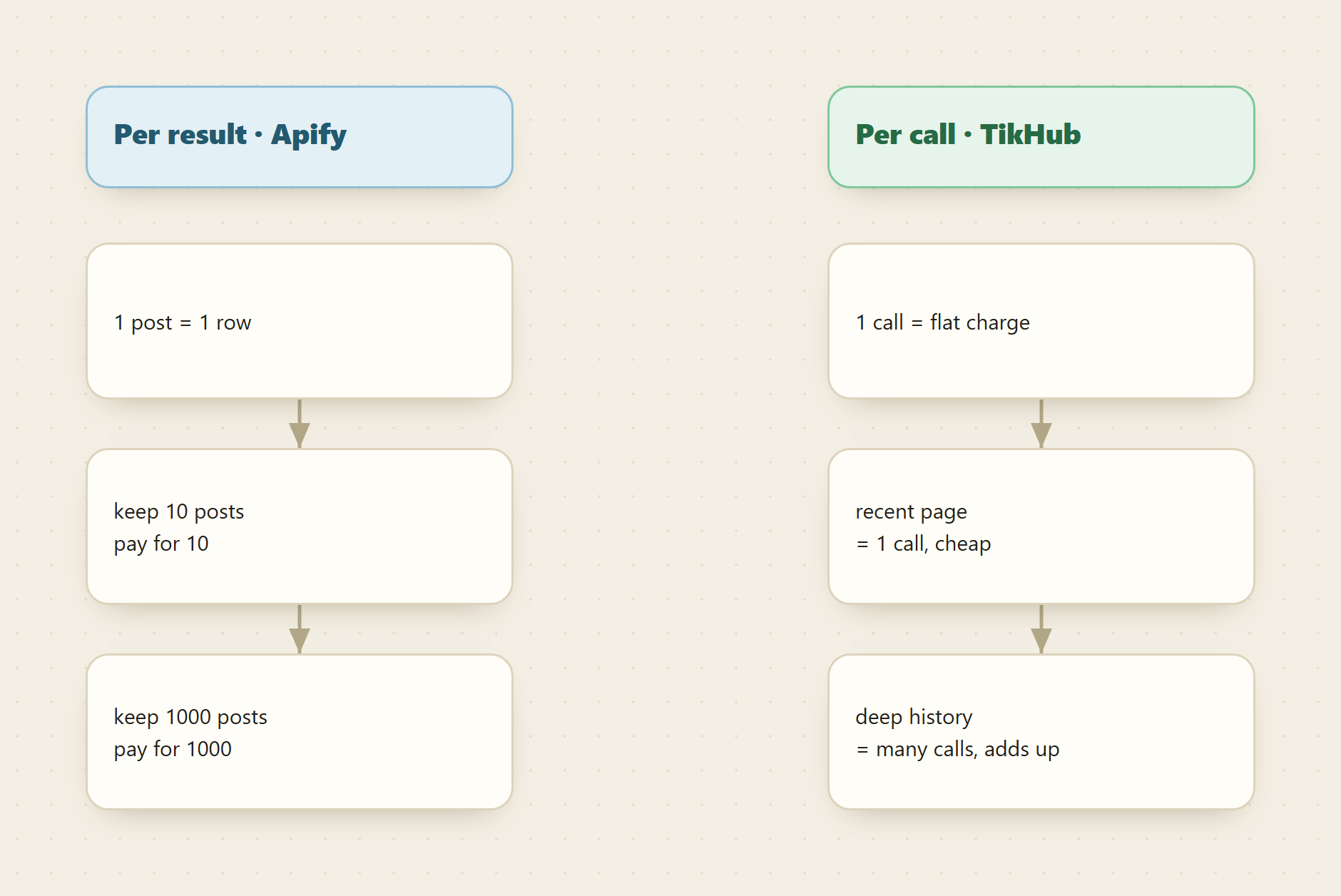
- Apify actors bill per result: you pay for each row returned, so cost scales with how much history and how many fields you keep.
- TikHub bills per call: one flat charge per request, but its user-posts route returns a fixed page and needs a
secUid, not a raw handle, so deep history means many paginated calls plus a resolve step. - Apify's
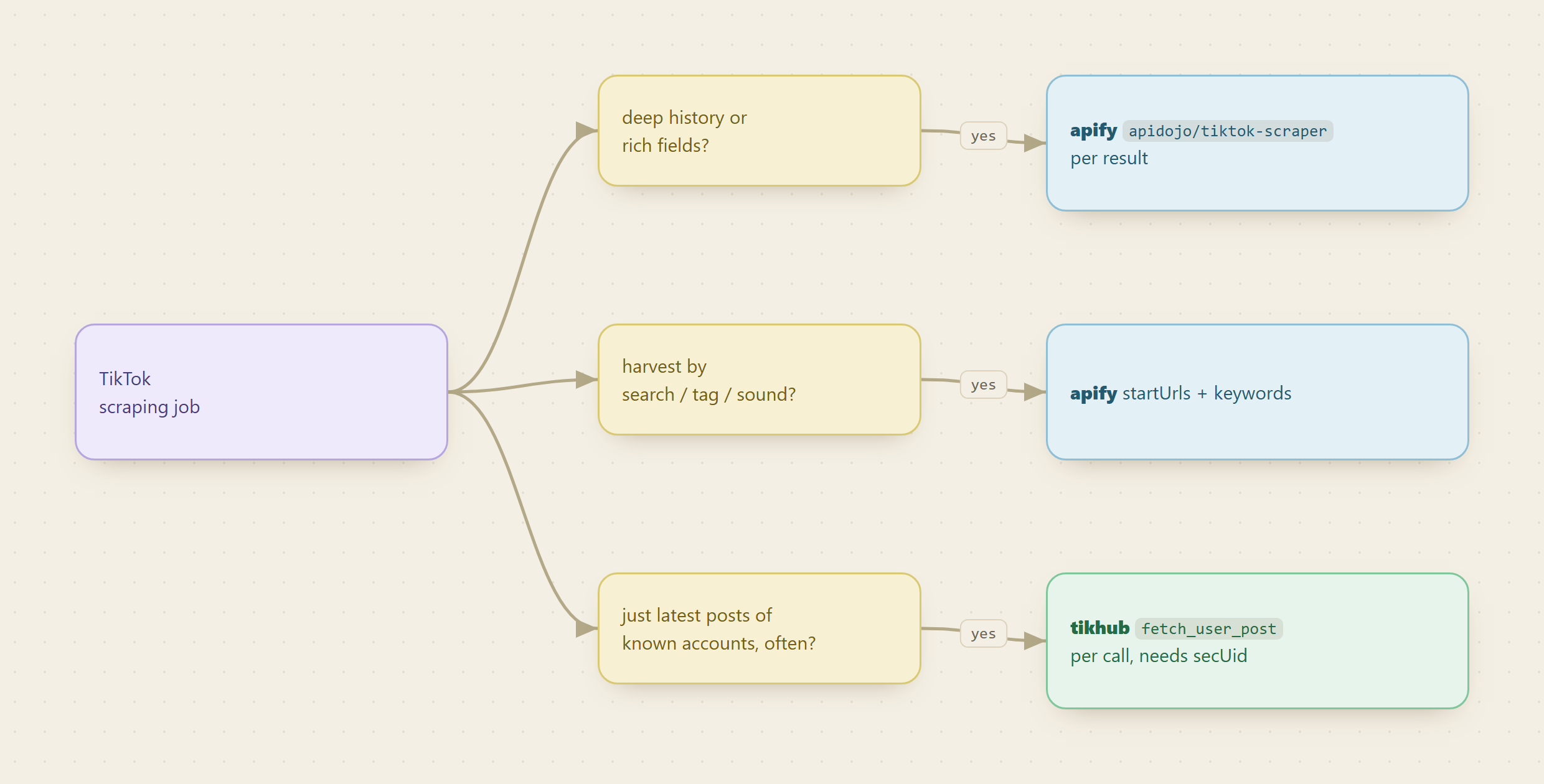
apidojo/tiktok-scrapertakesstartUrls(profile, video, search, tag, music, or place URLs) orkeywords, caps output withmaxItems, and returns rich per-post fields. - Rule of thumb: deep, field-heavy, one-time pulls lean Apify; shallow, high-frequency, per-account checks lean TikHub.
- Discover and inspect are free on Monid. You only pay on
run. Magnitudes live at monid.ai/tools.
📖 See also whether an Apify alternative exists for Reddit, where the same tradeoff plays out on a different platform.
Why does per result versus per call decide this?
Per result and per call are not two prices for the same thing. They are two different cost curves, and your job shape sits on exactly one of them.
Apify's apidojo/tiktok-scraper is a PER_RESULT endpoint. Every post it hands back is a billable row, at a fraction of a cent each. Pull ten posts from one profile and you pay for ten rows; pull the last thousand posts across a creator's whole history and you pay for a thousand. The cost tracks the data you keep, which is exactly what you want when the depth is the point and painful when you accidentally leave maxItems wide open.
TikHub's /api/v1/tiktok/web/fetch_user_post is a PER_CALL endpoint. One request is one charge, flat, regardless of how the response comes back. The catch is what a single call returns: this route pages an account's posts a fixed slice at a time and advances with a cursor, so getting a long history is not one cheap call, it is many cheap calls stitched together. For a shallow skim (the most recent posts from one account), that is the cheapest route on the board. For deep history, the call count climbs and the per-call advantage narrows.
How do the two compare, field by field?
Apify apidojo/tiktok-scraper | TikHub fetch_user_post | |
|---|---|---|
| Billing shape | Per result (each post is a billable row) | Per call (flat per request) |
| Input | startUrls (profile, video, search, tag, music, place) or keywords, with maxItems | secUid plus cursor, fixed page size |
| Handle handling | Accepts profile and content URLs directly | Needs a secUid, so raw handles require a resolve step first |
| History depth | Deep: bound it with maxItems and pull as far back as you pay for | Shallow per call: paginate with cursor for more |
| Field richness | Rich per post: views, likes, comments, shares, bookmarks, hashtags, audio, media URLs | Standard web post objects, page by page |
| Best-fit job | Deep one-time pulls, search and tag harvests, field-heavy research | Cheap recurring checks of one account's latest posts |
The honest read is a routing rule, not a scoreboard. If you are harvesting a creator's full back catalog, or pulling every post under a hashtag or a trending sound, Apify's URL-and-keyword inputs and deep fields do the job in one endpoint, and the per-result bill is the fair price for real volume. If you are polling a known set of accounts for their newest posts on a schedule, TikHub's flat per-call charge on the recent page is hard to beat, and you never pay for history you already have.
What does each one actually return?
Depth of history is only half the question. The other half is whether the fields you need come back at all.
The Apify actor is the generous one. Point it at a profile URL and each post carries the full engagement set (views, likes, comments, shares, bookmarks), plus hashtags, audio and song metadata, and media URLs. For research, the fields that earn their keep are rarely the follower count. They are per-post views, which tell you real reach, and the audio metadata, which surfaces a sound breaking out before the pile-on. Because startUrls also accepts search, tag, music, and place URLs, one endpoint covers profile harvesting and discovery harvesting without switching tools.
TikHub's user-posts route is leaner and built for a different rhythm. You hand it a secUid and it returns that account's posts a page at a time, advancing with cursor and an optional sort order. It is precise and cheap for "what did this account post lately," but two practical facts shape any plan built on it: the page size is fixed per call, so depth is a pagination loop, and the input is a secUid rather than a @handle, so a pipeline that starts from usernames needs a resolve step to turn each handle into its secUid before this route will answer. Read the exact params yourself with a free monid inspect -p tikhub -e /api/v1/tiktok/web/fetch_user_post before you script against it, because those two facts are the ones people miss.
How do you run one, and what does the cheaper neighbour cost?
Here is a real Apify run. It points at one profile, caps the output so the first bill is small, and waits inline so the result comes straight back.
For agents
Grab an API key at app.monid.ai, then paste this to your agent and hand it the key:
set up https://monid.ai/SKILL.md
It learns the whole discover, inspect, run workflow itself. More details in the agent quickstart.
For humans
npm install -g @monid-ai/cli
monid keys add --label main --key <your-api-key>
More details in the CLI quickstart.
Inspect the schema and price for free, then run one profile with a small maxItems:
monid inspect -p apify -e /apidojo/tiktok-scraper

monid run -p apify -e /apidojo/tiktok-scraper \
  -i '{"startUrls":["https://www.tiktok.com/@gordonramsayofficial"],"maxItems":50}' -w
That returns up to fifty posts for the profile, each a billable row at a fraction of a cent. Raise maxItems when you want more history, swap the profile URL for a #hashtag, sound, or search URL to harvest by topic, or pass keywords instead to run a query.
For the TikHub side, do not copy a command blind. Run the free inspect above to read the current query params, resolve your handle to its secUid, then call /api/v1/tiktok/web/fetch_user_post with that secUid and page through with cursor. It is the cheaper route for a shallow, recurring check, and Monid runs it through the same balance as the Apify job.
What does a real TikTok pull cost?
We do not print rates, because the unit that matters is cost per useful post, and that depends on your job. Live magnitudes are on monid.ai/tools. The reasoning that survives any price change:
- For a one-time deep pull, Apify's per-result price times your post count is the whole bill, and it is usually the cheaper way to get thousands of field-rich rows in a single sweep.
- For a recurring shallow check of known accounts, TikHub's flat per-call charge on the recent page beats paying per result for posts you mostly already have.
- The crossover is history depth. The deeper you page TikHub for old posts, the more its call count climbs toward what Apify would have charged in one run, so map your depth before you pick.
Because both are the same balance, the safe move is to run each on one account, compare the returned fields against what TikTok shows by hand, and route the rest of your list to whichever shape wins for that list.
What happens when an endpoint rejects your call?
You find out for free, and the message tells you whether the problem is yours.
We ran the TikHub video search on 2026-08-19 with the one field its schema marks required, using the example value the schema itself supplies:
monid run -p tikhub -e /api/v1/tiktok/web/fetch_search_video --query '{"keyword":"TikTok"}' -w
Provider Response: 400
Cost:              nothing
Two attempts, both rejected, both free. The body is the useful part:
code         400
request_id   b66714e8-fdef-48a4-88a2-2f2a14381473
message      Request failed. Please retry. Check the docs below to verify
             your parameters, test with the default demo parameters, and
             send the response JSON to support. You will not be charged.
docs         a link to the endpoint's own documentation
support      a Discord invite
router       /api/v1/tiktok/web/fetch_search_video
Three things in that response are worth more than the failure costs. A request_id you can quote to support rather than describing the problem in prose. A documentation link for the exact route rather than the vendor's front page. And an explicit statement that the call was not billed, which the run's own cost line confirms independently.
The endpoint's parameter notes mention that a cookie can be supplied when the interface returns an error, which suggests search is the route most sensitive to session state. That is a real limitation and it is not visible in the schema, where keyword is the only required field.
The general rule this run illustrates, and the reason it is in a comparison post: the schema tells you what an endpoint accepts, not what it needs today. Both of these providers are reading a platform that changes underneath them. Run the specific call you plan to depend on, read the body rather than the status, and do it before the batch rather than during it. Rejected calls cost nothing, which makes that check close to free on either provider.
📖 See also pulling any TikTok profile or video from one endpoint for the route that does take a plain handle, and tracking TikTok trends on a schedule for the recurring version of this job.
Choosing without running both
If you cannot spare the afternoon, three questions settle it faster than a comparison table:
Do you hold handles or identifiers? TikHub's user-posts route wants a secUid, not an @handle, so a handle-first list needs a resolve step before anything else. If your input is handles and you want one call, the one-endpoint route removes that friction entirely.
Is this one deep pull or many shallow ones? Deep history in a single job favours per-result billing, because you are paying for rows you genuinely want. A daily check across known accounts favours per-call, because the flat charge amortises across a small fixed page. Getting this backwards is the most common way a TikTok bill surprises somebody, and we walked the volume case through in pulling ten thousand profiles without building a scraper.
How many platforms will this pipeline end up covering? If TikTok is the first of several, the comparison stops being about these two providers and becomes about the shape of the layer underneath them. The social media scraping guide covers that decision, and the TikTok tools page lists what is currently reachable.
None of those three needs a run to answer, and together they get most teams to the right provider before they spend anything.
When should you not use either?
Field names, coverage, and page sizes shift as TikTok changes and as each provider updates. Do not trust this table over your own run. The Apify actor is the more flexible input surface and the richer output, but it bills for every row, so a runaway maxItems is where a bill quietly grows. TikHub is genuinely cheaper for shallow, frequent pulls, but the secUid requirement and fixed page size are real friction that a handle-first pipeline has to plan around. Inspect both, run one account through each, and let the two invoices decide.
FAQ
Which is cheaper for TikTok scraping, Apify or TikHub? It depends on depth. For a deep, one-time, field-heavy pull, Apify's per-result billing is usually cheaper per useful post. For a shallow, recurring check of known accounts, TikHub's flat per-call charge wins. Magnitudes are on monid.ai/tools.
What does per result versus per call actually change? Per result means every post returned is a billable row, so cost scales with the data you keep. Per call means one flat charge per request, but TikHub's user-posts route returns a fixed page, so deep history is many calls, not one.
Can I pass a plain @handle to both?
To Apify, yes: startUrls accepts profile URLs directly. To TikHub's fetch_user_post, no: it needs a secUid, so a handle-first pipeline adds a resolve step. Confirm the params with monid inspect -p tikhub -e /api/v1/tiktok/web/fetch_user_post.
Do I need two accounts to compare them? No. Both Apify and TikHub are reachable from one Monid wallet, billed pay-as-you-go at the price shown before you run.
Last updated August 2026.